

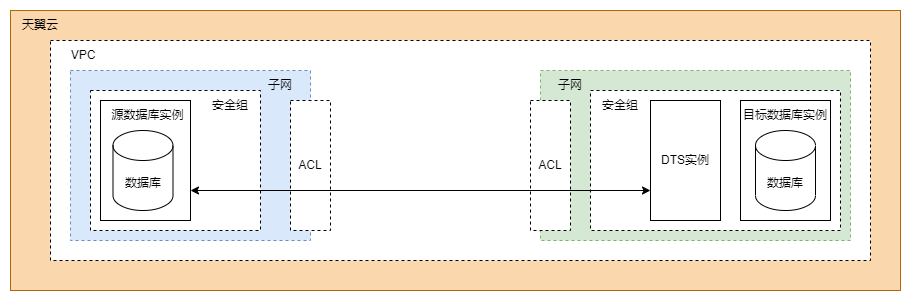
Resources in the same VPC can communicate with each other by default. If you want to migrate or synchronize data from a source database instance to a destination database instance within a VPC, you need to focus on the configuration of network security policies. Specifically, you need to modify the ACL rules of the subnet or configure the security group of the database instance.
The following parts describe the network communication mode and how to configure the DTS instance and the network security policies.
Network Communication Mode
The following figure shows the network communication mode.
Configuring the DTS Instance
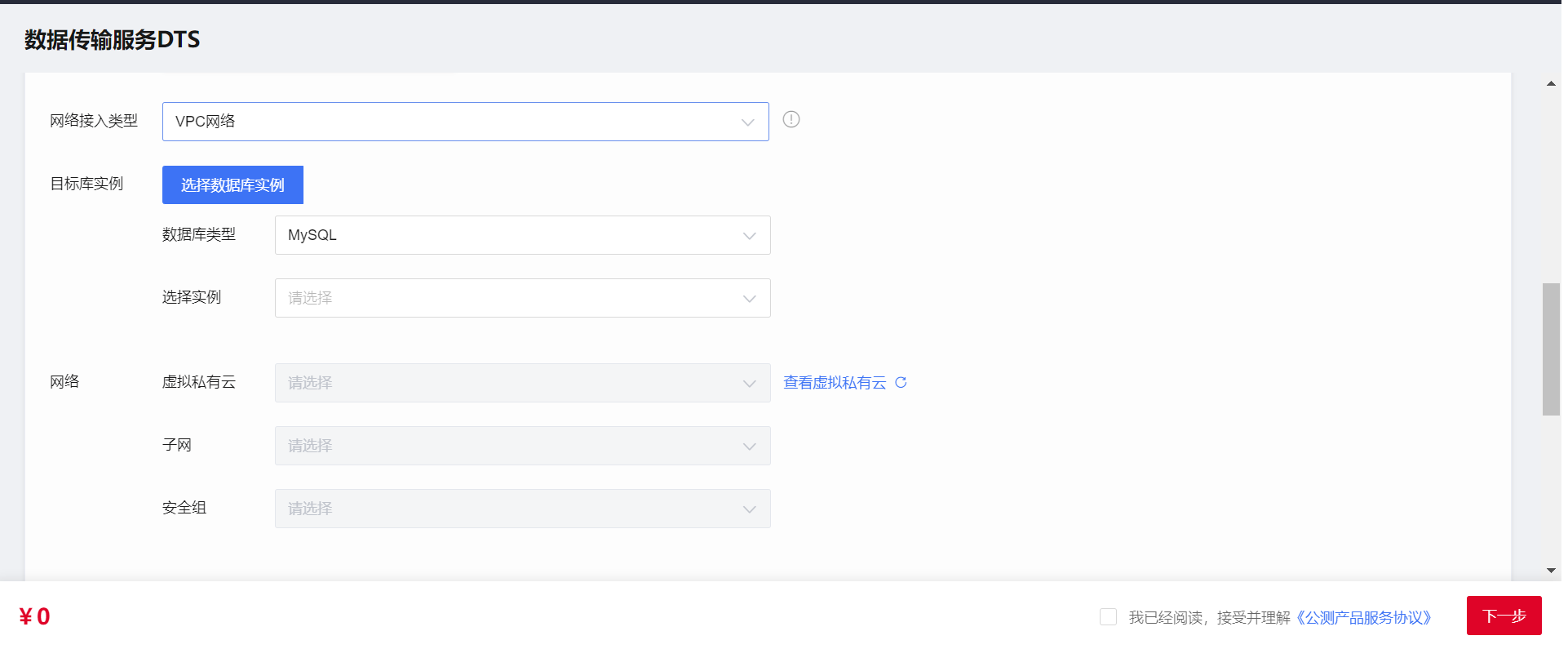
Configure the network type for the DTS instance. Select VPC, as shown in the following figure.
Configuring Network Security Policies
By default, subnets in the same VPC can communicate with each other. If a subnet is not configured with extra ACL rules, you can ignore the network ACL configuration. Resources such as ECS instances and database instances associated with the same security group can communicate with each other by default.
The following part shows how to configure network security policies in the case that the subnets have been configured with ACL rules and the database instances are associated with different security groups:
Configure the subnet's network ACL and security group for the source database instance.
Network ACL: Add an inbound rule to allow traffic from the private IP address and random port of the DTS instance to the IP address and listening port of the source database.
Security group: Add an inbound rule to allow traffic from the private IP address of the DTS instance to the listening port of the source database.
Configure the subnet's network ACL and security group for the destination database instance.
If the DTS instance and the destination database instance are located in the same subnet and associated with the same security group, they can communicate with each other by default, and the default outbound rule allows traffic destined for everywhere. In this case, no configuration is required.
If the subnet's network ACL or security group has been configured for the destination database instance, you need to modify specific rules to allow traffic from the private IP address and port of the DTS instance.
Network ACL: Make sure that the outbound traffic from the private IP address of the DTS instance to the IP address and listening port of the destination database is allowed.
Security group: Make sure that the outbound traffic from the private IP address and a random port of the DTS instance to the IP address and listening port of the destination database is allowed.
Configure the IP address trustlist for the database.
You need to allow the private IP address of the DTS instance to access the source database. The method to configure an IP address trustlist for a database may vary depending on the database type. For more information, see the relevant official database documentation.