

Can a deleted ECS be activated again?
No. A cloud server that has been deleted cannot be activated again. Therefore, please ensure that the data on the cloud server has been backed up or migrated before deleting the cloud server. The data cannot be retrieved after you delete the cloud server, so please proceed with caution.
In order to ensure the security of your data, please follow the operation steps described below:
Confirm that your data has been backed up: You need to make sure that your data has been fully backed up to another secure location, such as another cloud server, or it has been mirrored or snapshotted.
Confirm that your data has been migrated: If you need to migrate your data to another cloud server or another cloud service product, you need to ensure that the data migration has been completed and the data has been successfully synchronized.
Delete the cloud server: Once you confirm that your data has been backed up or migrated and you have confirmed that the cloud server can be deleted, follow the instructions provided on the cloud server console to delete the cloud server.
For details about how to backup and migrate a cloud server, see Back up a Cloud Server and Migrate a Cloud Server.
How do I delete an ECS?
Log in to the eSurfing Cloud ECS console and select the ECS that needs to be deleted.
Only pay-as-you-go ECSs support deletion, and they can only be deleted when they are shut down. Firstly, in the upper left corner of the ECS list, click the shutdown button.

Wait for the ECS to be shut down. Then, in the far-right Operation column, click More > Delete
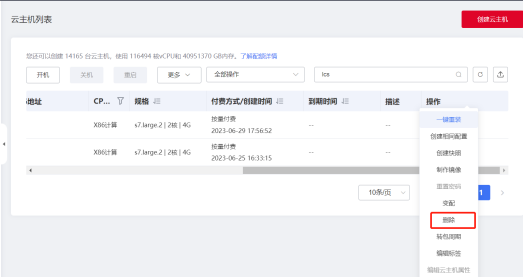
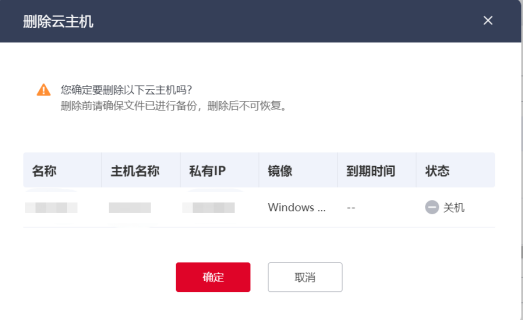
On the pop-up page, click OK to delete the ECS.
If there are snapshots on the cloud server, can I delete the cloud server?
The recovery data snapshotted on a cloud server and the function of applying for a cloud server depend on the data on the cloud server. If snapshots have been created on the cloud server and have not been deleted, the cloud server cannot be deleted, and the Delete button on the console is grayed out. Particularly, if the cloud server is bound with a snapshot policy but there is no snapshot on it, the cloud server can be deleted.